
Recent Posts

Pages: [1] 2 3 ... 10
1
Get ObjReader & Documentation / Re: Objreader64 Version 5.00
« Last post by Patrice Terrier on October 15, 2026, 08:44:53 am »
ObjReader 5.00 - What's new


SKELETAL ANIMATION (new)
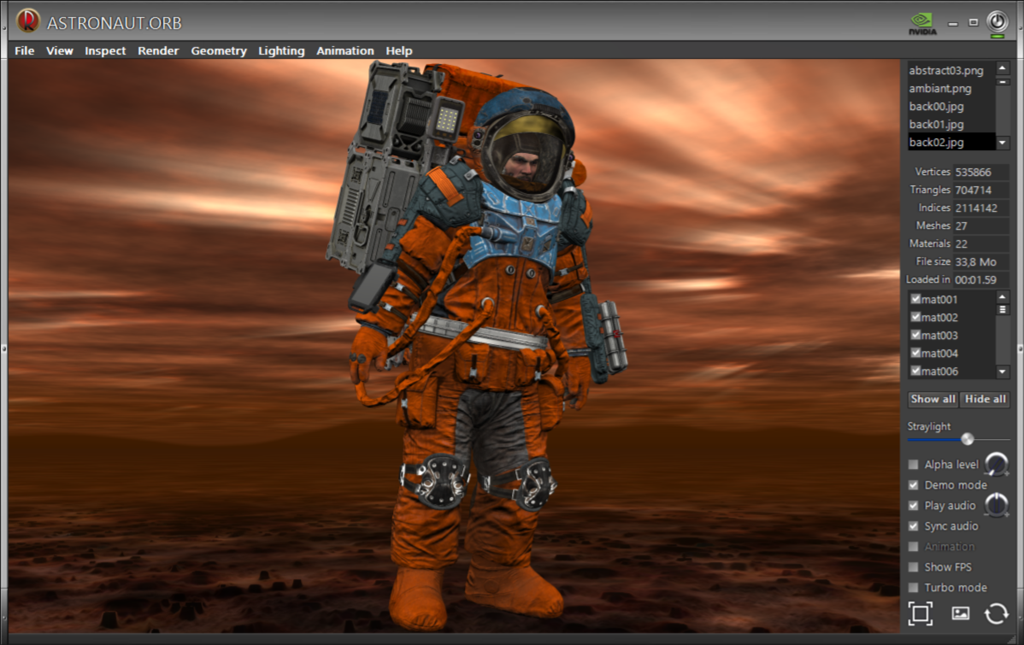
  • Bone / skin animation for Wavefront-based .orb models, computed on the GPU (works like Sketchfab).
  • New sidecar file <model>.mtls ("material skin"): skeleton, vertex weights and animation clips, LZNT1 compressed.
  • The .mtls file is the switch: present = animated, absent = static model.
  • Totally optional: models without a .mtls behave exactly as before; never interferes with the existing .mtl directives (#rotate, #pulse, #inflate, #move) nor with the Animation checkbox.
  • Animation > Skeletal Animation menu: one line per clip found in the file, plus Pause. The first clip starts automatically.
  • New global .mtl directive:
Code: [Select]
#skeletal n   (1..n, clip to play first)
  • Works in every render mode: Blinn, normal map, inspection, Minnaert, Gooch, Toon, X-ray, fancy texture modes, and the wireframe overlay (skinned lines).
  • The whole engine adds about 10 KB to the binary.


ORBTOOL (GLB -> ORB converter)
  • Reads skins and animations from .glb files (joints, weights, inverse bind matrices, clips).
  • Writes <model>.mtls automatically whenever the .glb has a skin (no command-line switch).

EXPORT .ORB TO .MTL/.OBJ
  • The export now keeps the skeletal animation: <target>.mtls is written beside the .obj.
  • Loading the exported .obj animates it; the .orb that OR then builds from it gets its own .mtls, so Reload works too.

SHADER BACKGROUNDS (.shc)
  • New native SHC renderer, synchronized with the same audio as the 3D model.
  • Old .fs animated backgrounds are converted to .shc on the fly: existing projects keep working.
  • Drag and drop of .shc files and of any audio file, on the fly.
  • New File > Save shader pose to mtl file (enabled only while a .shc background runs).
  • New .mtl directive:
Code: [Select]
#shaderpose x y   (shader orientation, kept in any window size or full screen)
    Restored at load, with or without MouseON.
  • Fix: no freeze when switching shaders while a video shader (WebView2) is playing.

COMPATIBILITY / FIXES
  • Intel GPUs: model shaders no longer fail to compile.
  • No more silent crash on exit (0xC015000F), fixed in WinLIFT64.dll. Also fixes every other WinLIFT-based application.
  • Double-click on an .orb file in Explorer loads the model again.
  • Cleaner exit: OpenGL resources released while the windows still exist.
  • Sync timer no longer spins a CPU core when idle.
  • ListViews: last row no longer truncated, no more horizontal scrollbar.

SIZE (byte hunting)
  • CRT and STL removed from ObjReader.
  • Binary from 536 KB down to about 335 KB, skeletal animation included.
Special thanks to UEZ for testing on Intel hardware and for spotting the silent crash on exit.
2
Get ObjReader & Documentation / Objreader64 Version 5.00
« Last post by Patrice Terrier on October 12, 2026, 06:12:02 pm »
ObjReader 5.00 - sneak preview

Skeletal animation comes to OR

Until now, OR animated meshes with its own .mtl directives (#rotate, #pulse, #inflate, #move...).
Version 5.00 adds true bone / skin animation, the same kind you see on Sketchfab,
fully computed on the GPU, while keeping the Wavefront spirit of OR.

How it works
  • orbtool converts an animated .glb into the usual .orb + .mtl, and when the GLB has a skin, it also writes a small sidecar: <model>.mtls (material skin)
  • The .mtls holds the skeleton, the vertex weights and all the animation clips, LZNT1 compressed
  • The .mtls file is the switch: when it sits beside the .orb, the model comes alive; remove it and you are back to the static model
  • It never interferes with the existing directives nor with the Animation checkbox

Animation > Skeletal Animation
  • The first clip starts automatically, as on Sketchfab
  • The submenu lists every clip found in the file (Mixamo Walk, Idle, Running... for the astronaut)
  • Pause holds the current pose
  • New global directive to choose the starting clip:
Code: [Select]
#skeletal 2

Works everywhere in OR
  • All render modes: Blinn, normal map, inspection, Minnaert, Gooch, Toon, X-ray, fancy texture modes, wireframe overlay
  • Audio sync, .shc and .fs backgrounds
  • Export .ORB to .MTL/.OBJ now keeps the animation: the exported .obj and the .orb rebuilt from it walk exactly like the original
  • Reload model works as expected

Shader backgrounds: save the view
  • New File > Save shader pose to mtl file (enabled only while a .shc background is running)
  • The shader orientation (iMouse) is stored in the .mtl, independent of the window size:
Code: [Select]
#wallpaper @73tGzB.shc
#shaderpose 0.2315 0.3860
  • It is restored at load, with or without MouseON

Still OR
  • Native C/C++, Win32 SDK
  • The whole skeletal animation engine (CPU bone evaluation + GPU skinning + menu) adds about 10 KB to the binary: OR 5.00 weighs 335 KB
  • Totally optional: models without a .mtls behave exactly as before

Test lab: the Mixamo astronaut (538,589 vertices, 72 bones, 3 clips), walking in front of an audio-synced .shc sky.


Download the Sneak preview

Unzip, then use RunMe.bat


3
Eye Candies / Re: ShaderPlay new version
« Last post by Patrice Terrier on September 18, 2026, 07:16:35 pm »
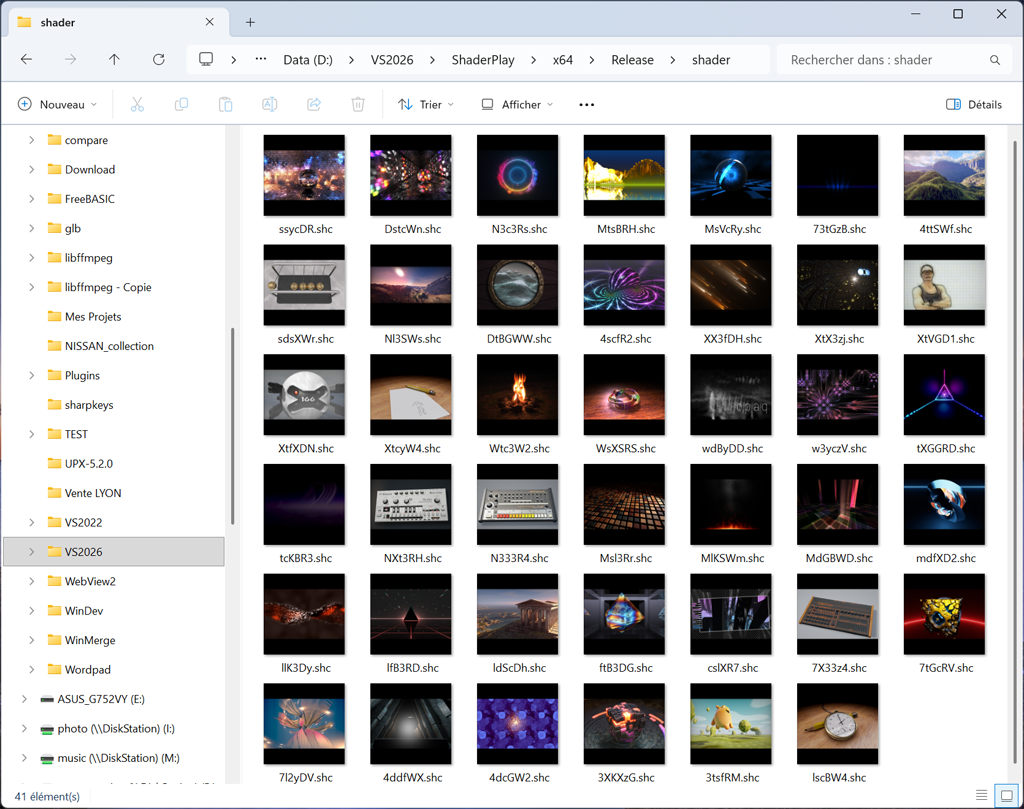
The ShaderPlay Compound format (.shc) is Explorer compatible.
you can drag and existing .shc file on ShaderPlay to play it without internet connection.

The thumbnail peview shows you the content of the shader.

4
WebmCap / WebmCap
« Last post by Patrice Terrier on September 16, 2026, 08:48:18 am »
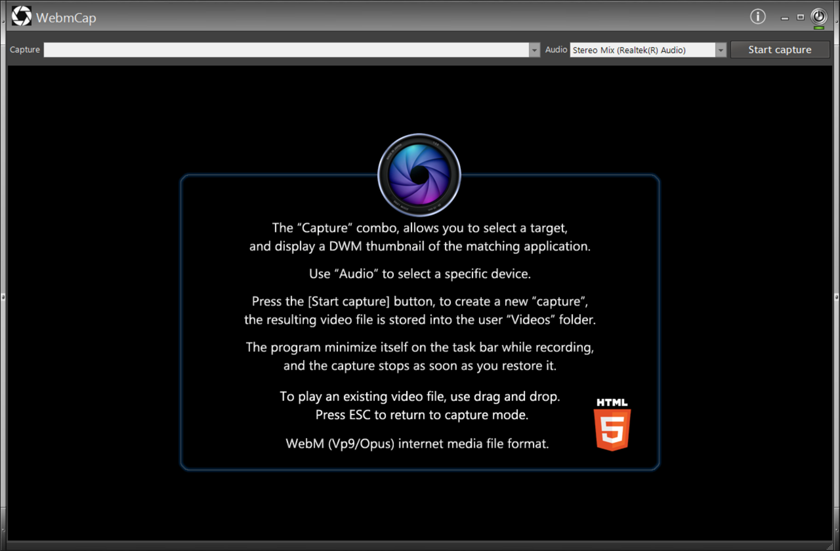
WebmCap - Tiny native WebM screen recorder/player

WebmCap is the successor to FFplay/FFcapture. It no longer uses FFmpeg.exe, thus drastically reducing the binary size.
It is designed primarily for creating tutorial videos.

It captures a selected desktop window in real time and creates a WebM video using VP9 for video and Opus for audio.


The complete executable is currently only:

1213 KB

Despite its small size, WebmCap includes the complete recording and WebM muxing engine.

Main features

  • Native Windows x64 C/C++ application.
  • Desktop/window video capture.
  • VP9 video encoding using libvpx.
  • Opus audio encoding.
  • Native WebM muxing using libwebm.
  • 48 kHz stereo audio capture.
  • Correct real-time audio/video synchronization.
  • Built-in video player using the WinLIFT WV2B/WebView2 browser control.
  • Drag and drop a video file onto WebmCap to play it.
  • Playback is not artificially restricted to WebM: any video format supported by WV2B/WebView2 can be used.
  • Press ESC to close the player and return to capture mode.

Why WebM / VP9 / Opus?

The original goal was to avoid relying on a large external multimedia application such as FFmpeg for a relatively simple screen-recording task.

WebmCap therefore uses only the components it actually needs.

libvpx was reduced to the VP9 encoding functionality required by WebmCap, Opus is statically linked, and the required libwebm muxer sources are compiled directly into the application.

The project also uses TCLib to minimize conventional CRT overhead.

The result is a complete recorder/player of approximately 1.2 MB.

Recording quality

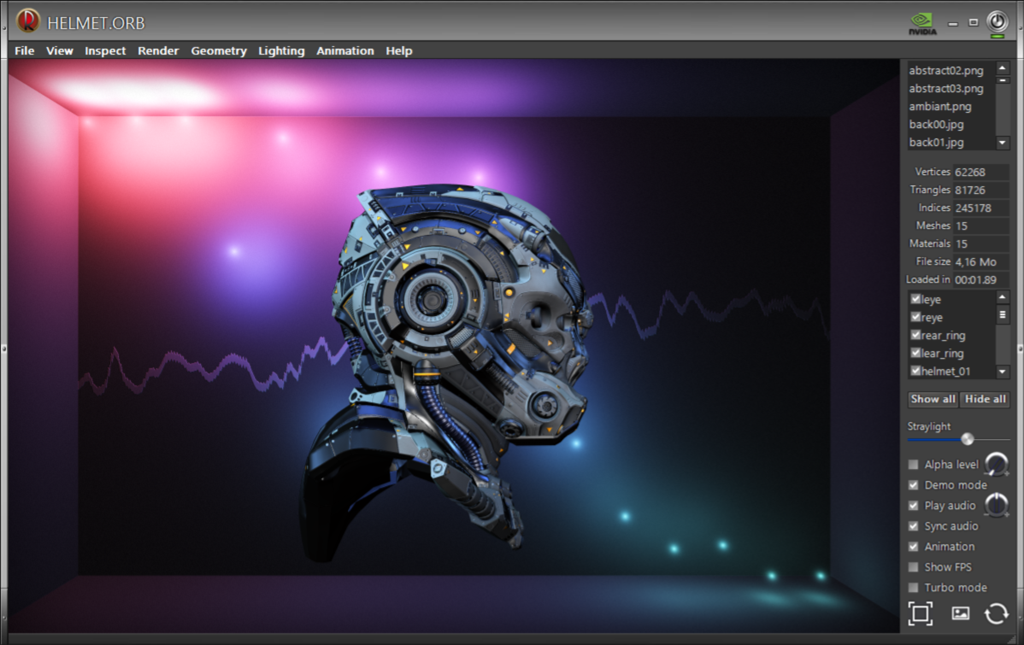
A demanding test was made using an ObjReader 3D animation (Helmet.orb).

For the same 71-second animation:

Code: [Select]
FFCapture : 91.0 MB / 71 seconds
WebmCap   : 58.4 MB / 71 seconds

The WebmCap VP9 recording retains excellent visual quality while producing a substantially smaller file.

ObjReader was rendering the animation at approximately 239/240 FPS while WebmCap recorded it at 30 FPS.

Playback

WebmCap is primarily a WebM recorder, but it can also be used as a lightweight video player.

Simply drag and drop an existing video file onto the WebmCap window.

The video is displayed using WV2B/WebView2. Press ESC to close the player and immediately return to the capture interface.

There is deliberately no hard-coded list of supported video extensions: the file is passed directly to WV2B/WebView2, which determines whether it can be played.

Implementation

WebmCap is written in native procedural C/C++ for Windows x64.

It uses:

  • Win32 API
  • GDI desktop capture
  • WaveIn audio capture
  • libvpx / VP9
  • Opus
  • libwebm
  • WinLIFT/GDImage
  • WV2B / WebView2 for playback
  • TCLib

WebmCap is another example of what can still be achieved on Windows by staying close to the native API and including only the code actually required.
5
Eye Candies / ShaderPlay new version
« Last post by Patrice Terrier on September 12, 2026, 08:57:14 am »
ShaderPlay version 2.00

ShaderPlay has been completely reworked and can now capture and play Shadertoy projects directly from their Web URL.

ShaderPlay is a tiny native Windows Shadertoy player written in procedural C/C++ using the Win32 API and OpenGL. It supports complex multipass shaders, textures, cubemaps, video, music and Sound shaders, keyboard and mouse input, as well as audio-reactive visualizations.

The complete Visual Studio 2022 C/C++ project is attached to this post, including the source code and a selection of ready-to-use .shc examples.

The resulting ShaderPlay executable:


Capturing a Shadertoy project

Importing a shader from the Shadertoy website is very simple.

Open the shader you want on Shadertoy in your usual Web browser and copy its URL from the browser address bar to the Windows clipboard.

For example:

Code: [Select]
https://www.shadertoy.com/view/XXXXXXXX
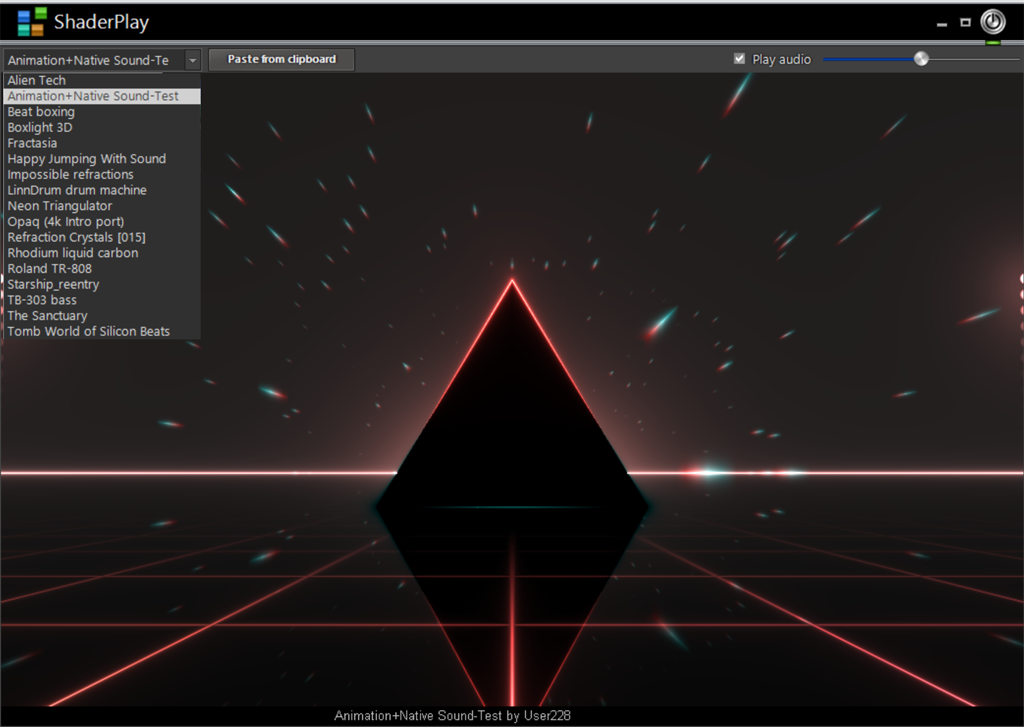
When ShaderPlay detects a valid Shadertoy URL in the clipboard, a "Paste from clipboard" button automatically appears.

Click this button to start the capture.

ShaderPlay then connects to Shadertoy, analyzes the project and retrieves everything required to reproduce it locally. This includes the GLSL code and, depending on the shader, its multipass information, textures, cubemaps, video and music resources.

Once the capture is complete, the shader can be played immediately and is saved in the local shader folder beside ShaderPlay.exe as a single .shc (Shader Compound) file.

The workflow is therefore:

Open the shader on Shadertoy -> copy its URL -> the "Paste from clipboard" button appears -> click it -> ShaderPlay captures the project and creates the standalone .shc file.


The .shc Shader Compound format

An .shc file packages the Shadertoy project and all the resources required to play it into a single standalone file.

Depending on the original project, this can include the shader data, multipass information, textures, cubemaps, video and music.

Once the .shc has been created, the original Shadertoy URL is no longer required to play the shader. The file can simply be kept in the local shader folder, copied to another ShaderPlay installation or exchanged with another user.

Each .shc also contains its own PNG thumbnail, allowing Windows Explorer to display a visual preview of the shader.

This makes .shc more than a simple cache: it is the portable ShaderPlay document format.


BBPlugin support

ShaderPlay also retains support for the existing native BBPlugin DLL visualizations.

When a BBPlugin folder is present beside the executable, ShaderPlay automatically detects the available plugins.

In that configuration, the interface provides two combo boxes: one for selecting the native BBPlugin visualizations and another for selecting the .shc Shadertoy shaders.

ShaderPlay can therefore be used both as the original BBPlugin visualization host and as a native Shadertoy player.


Audio

ShaderPlay can work with several different audio sources.

When a Shadertoy project includes its own music/audio track, that track is retrieved during capture and embedded directly into the .shc file. It is restored automatically when the shader is played, so no external audio file is required.

You can also drag and drop your own audio file onto ShaderPlay.

In this case, the dropped audio takes priority over the audio track built into the shader. This makes it possible to play an audio-reactive shader using your own music instead of its original track.

When the dropped audio has finished, ShaderPlay can return to the audio supplied by the shader itself.

Shadertoy Sound shaders are different again. They do not use a prerecorded audio track: the sound itself is generated in real time by the GLSL shader.

The same audio system can also drive the native BBPlugin visualizations.


A note about GPU performance

ShaderPlay executes the original Shadertoy GLSL code directly on the GPU.

It deliberately does not simplify or rewrite shaders to accommodate slower hardware.

Many shaders will run perfectly well on modest hardware, but some Shadertoy projects are extraordinarily demanding, particularly complex multipass shaders and shaders performing intensive real-time Sound calculations.

For the most demanding shaders, a dedicated GPU is highly recommended.

Integrated graphics may run many shaders correctly, but particularly intensive projects can result in lower frame rates, sluggish interaction or occasional short stalls.

ShaderPlay's objective is to reproduce the original Shadertoy project as faithfully as possible rather than modify it to accommodate slower graphics hardware.


Source code

The attachment contains the complete C/C++ Visual Studio 2022 project, not just the compiled executable.

This is native Windows code using the Win32 API and OpenGL, so anyone interested in how the Shadertoy environment, multipass rendering, resources, Sound shaders, audio and .shc packaging are implemented can examine and modify the actual source code.

A selection of ready-to-use .shc files is included, so ShaderPlay can be tested immediately without first capturing shaders from the Web.

You can then visit Shadertoy, find shaders you like, copy their Web URL and let ShaderPlay capture them to build your own local collection of standalone .shc files.

And, ShaderPlay.exe is only 79 KB.
6
The concept / WinLIFT 64-bit 8.00 (is attached to this post)
« Last post by Patrice Terrier on August 03, 2026, 05:22:16 pm »
WinLIFT 8.00 - Major update

WinLIFT 8.00 is a major evolution of my native Win32 skinning framework.

BBRTV (BassBox Radio/TV) was used as the development laboratory for this release and is provided as a working example showing how to use the new WinLIFT 8.00 API in a real-world application.

What's new in WinLIFT 8.00

  • New Grid control
    A native WinLIFT Grid control with headers, multiple columns, text, images, edit/combo/button support, hidden columns, selection management, scrolling and resizable columns.

  • New image compositor
    WinLIFT can compose the complete application window into an image, including the non-client area, child controls, scrollbars and GDImage content.

  • Tighter GDImage integration
    WinLIFT and GDImage now cooperate more closely, especially for WM_PRINT rendering and image composition.

  • DWM popup overlay support
    The compositor can integrate GDImage DWM-composited popup overlays used by applications such as MBox64 and ObjReader64.

  • Integrated snapshot
    CTRL+SCREENSHOT can be used at any time to create a snapshot of the fully composed application window. The picture is saved beside the executable.

  • New window animation engine
    skShowWindow() can display a window using one of the new WinLIFT effects:

        SK_EFFECT_FALLZOOM
        SK_EFFECT_TRANSLUCENTSPIRAL
        SK_EFFECT_CURL_FROM_BOTTOMLEFT
        SK_EFFECT_CURL_FROM_BOTTOMRIGHT
        SK_EFFECT_CURL_FROM_TOPRIGHT
        SK_EFFECT_CURL_FROM_TOPLEFT
        SK_EFFECT_LIQUIDFILL
        SK_EFFECT_BLURFOCUS

    The Curl effects are directional and the new effects are generated entirely at runtime from the composed window image.

  • WebView2 integration
    WinLIFT provides a compact native API for embedding WebView2 into a skinned application.

  • Embedded DLL memory loader
    A DLL stored inside the WinLIFT RCDATA resources can be loaded directly from memory, without extracting it to disk.

    This is used to keep the WebView2/WRL implementation isolated from the main WinLIFT runtime while preserving single-DLL deployment.

  • DPI scaling helpers
    WinLIFT itself does not claim Windows DPI awareness.

    It provides built-in DPI scaling helpers instead. The host Windows DPI is used by default and the .sks USE_DPI property can provide an explicit scaling value when required.

    The image compositor is designed to remain compatible with the DPI environment of the host computer.

  • zVector
    Internal STL vector usage has been replaced by the lightweight zVector implementation.

  • Windows 10/11 improvements
    Several rendering and compatibility issues have been addressed, including TreeView focus, SYSHEADER rendering, scrollbar overlap and control redraw behavior.

  • Smaller runtime
    Despite the new Grid, compositor, animation engine, WebView2 support and memory loader, considerable work has been done to reduce the WinLIFT64.dll footprint and external runtime dependencies.
    The overall binary size is only 223 KB.
.
 
BBRTV - WinLIFT 8.00 example

BBRTV is not the subject of this release; it is the application I used to develop, test and demonstrate the new WinLIFT 8.00 functionality.

Its source code provides practical examples of the new Grid API, WebView2 integration, compositor, snapshot facility and window effects.
(A different effect is selected at each startup in loop mode).

The current C/C++ BBRTV executable is only: 67 KB

WinLIFT 8.00 remains a native 64-bit Unicode Win32 SDK framework, without MFC or .NET, designed for applications where full control of the Windows interface and a small native footprint are important.
7
64-bit SDK programming / Re: Load DLL from memory (using RCDATA)
« Last post by Patrice Terrier on August 03, 2026, 08:18:41 am »
Here is the 64-bit version, based on PB's code.
This one is used by WinLIFT 8.00, to load my WV2B.dll directly in memory from RCDATA without disk access.
It allows me to provide only one single WinLIFT64.dll, rather than two (easier for code distribution).

Code: [Select]
//+--------------------------------------------------------------------------+
//|                                                                          |
//|                          (LoadDLLfromMemory)                             |
//|                                                                          |
//|                         Author Patrice TERRIER                           |
//|                         copyright(c) 2007-2026                           |
//|                           www.zapsolution.com                            |
//|                        pterrier@zapsolution.com                          |
//|                                                                          |
//+--------------------------------------------------------------------------+
//|                  Project started on : 00-06-2007 (MM-DD-YYYY)            |
//|                        Last revised : 08-02-2026 (MM-DD-YYYY)            |
//+--------------------------------------------------------------------------+

#pragma once

static HMODULE Load_DLL(IN WCHAR* lpName) {
    typedef BOOL (WINAPI *DLLENTRYPROC)(HINSTANCE, DWORD, LPVOID);

    HMODULE hInstance = 0;
    HMODULE hModule = 0;
    HRSRC hResource = 0;
    HGLOBAL hGlobal = 0;
    BYTE* pRawDll = 0;
    BYTE* pImage = 0;
    DWORD RawDllSize = 0;
    DWORD HeadersSize = 0;
    DWORD OldProtect = 0;
    DWORD K = 0;
    LONG FunctionTableAdded = 0;

    IMAGE_DOS_HEADER* pSrcDos = 0;
    IMAGE_NT_HEADERS64* pSrcNt = 0;
    IMAGE_SECTION_HEADER* pSrcSection = 0;
    IMAGE_DOS_HEADER* pDstDos = 0;
    IMAGE_NT_HEADERS64* pDstNt = 0;
    IMAGE_SECTION_HEADER* pDstSection = 0;
    RUNTIME_FUNCTION* pFunctionTable = 0;

    if (!lpName) return 0;

    if (!GetModuleHandleEx(GET_MODULE_HANDLE_EX_FLAG_FROM_ADDRESS | GET_MODULE_HANDLE_EX_FLAG_UNCHANGED_REFCOUNT,
                           (LPCWSTR) (LONG_PTR) &Load_DLL, &hInstance)) return 0;

    hResource = FindResource(hInstance, lpName, RT_RCDATA);
    if (!hResource) return 0;

    RawDllSize = SizeofResource(hInstance, hResource);
    if (!RawDllSize) return 0;

    hGlobal = LoadResource(hInstance, hResource);
    if (!hGlobal) return 0;

    pRawDll = (BYTE*) LockResource(hGlobal);
    if (!pRawDll) return 0;

    if (RawDllSize < sizeof(IMAGE_DOS_HEADER)) return 0;

    pSrcDos = (IMAGE_DOS_HEADER*) pRawDll;
    if (pSrcDos->e_magic != IMAGE_DOS_SIGNATURE) return 0;
    if (pSrcDos->e_lfanew < 0) return 0;
    if ((QWORD) pSrcDos->e_lfanew + sizeof(IMAGE_NT_HEADERS64) > RawDllSize) return 0;

    pSrcNt = (IMAGE_NT_HEADERS64*) (pRawDll + pSrcDos->e_lfanew);
    if (pSrcNt->Signature != IMAGE_NT_SIGNATURE) return 0;
    if (pSrcNt->FileHeader.Machine != IMAGE_FILE_MACHINE_AMD64) return 0;
    if (pSrcNt->OptionalHeader.Magic != IMAGE_NT_OPTIONAL_HDR64_MAGIC) return 0;
    if (pSrcNt->FileHeader.SizeOfOptionalHeader != sizeof(IMAGE_OPTIONAL_HEADER64)) return 0;
    if (!pSrcNt->FileHeader.NumberOfSections) return 0;
    if (!pSrcNt->OptionalHeader.SizeOfImage) return 0;

    pSrcSection = IMAGE_FIRST_SECTION(pSrcNt);
    HeadersSize = (DWORD) ((BYTE*) (pSrcSection + pSrcNt->FileHeader.NumberOfSections) - pRawDll);
    if (HeadersSize > RawDllSize) return 0;
    if (pSrcNt->OptionalHeader.SizeOfHeaders < HeadersSize) return 0;
    if (pSrcNt->OptionalHeader.SizeOfHeaders > RawDllSize) return 0;

    pImage = (BYTE*) VirtualAlloc((LPVOID) (LONG_PTR) pSrcNt->OptionalHeader.ImageBase,
                                  pSrcNt->OptionalHeader.SizeOfImage,
                                  MEM_RESERVE | MEM_COMMIT, PAGE_EXECUTE_READWRITE);

    if (!pImage) {
        pImage = (BYTE*) VirtualAlloc(0, pSrcNt->OptionalHeader.SizeOfImage,
                                      MEM_RESERVE | MEM_COMMIT, PAGE_EXECUTE_READWRITE);
    }
    if (!pImage) return 0;

    memcpy(pImage, pRawDll, pSrcNt->OptionalHeader.SizeOfHeaders);

    pDstDos = (IMAGE_DOS_HEADER*) pImage;
    pDstNt = (IMAGE_NT_HEADERS64*) (pImage + pDstDos->e_lfanew);
    pDstSection = IMAGE_FIRST_SECTION(pDstNt);

    for (K = 0; K < pDstNt->FileHeader.NumberOfSections; K++) {
        DWORD RawSize = pDstSection[K].SizeOfRawData;
        DWORD RawOffset = pDstSection[K].PointerToRawData;
        DWORD VirtualAddress = pDstSection[K].VirtualAddress;
        DWORD VirtualSize = pDstSection[K].Misc.VirtualSize;

        if ((QWORD) VirtualAddress + max(RawSize, VirtualSize) > pDstNt->OptionalHeader.SizeOfImage) goto BailOut;

        if (RawSize) {
            if ((QWORD) RawOffset + RawSize > RawDllSize) goto BailOut;
            memcpy(pImage + VirtualAddress, pRawDll + RawOffset, RawSize);
        }

        if (VirtualSize > RawSize) {
            ClearMemory(pImage + VirtualAddress + RawSize, VirtualSize - RawSize);
        }
    }

    {
        QWORD Delta = (QWORD) pImage - pDstNt->OptionalHeader.ImageBase;
        IMAGE_DATA_DIRECTORY RelocDir = pDstNt->OptionalHeader.DataDirectory[IMAGE_DIRECTORY_ENTRY_BASERELOC];

        if (Delta) {
            if (!RelocDir.VirtualAddress || !RelocDir.Size) goto BailOut;
            if ((QWORD) RelocDir.VirtualAddress + RelocDir.Size > pDstNt->OptionalHeader.SizeOfImage) goto BailOut;

            IMAGE_BASE_RELOCATION* pReloc = (IMAGE_BASE_RELOCATION*) (pImage + RelocDir.VirtualAddress);
            BYTE* pRelocEnd = (BYTE*) pReloc + RelocDir.Size;

            while ((BYTE*) pReloc < pRelocEnd && pReloc->SizeOfBlock) {
                if (pReloc->SizeOfBlock < sizeof(IMAGE_BASE_RELOCATION)) goto BailOut;
                if ((BYTE*) pReloc + pReloc->SizeOfBlock > pRelocEnd) goto BailOut;

                WORD* pTypeOffset = (WORD*) ((BYTE*) pReloc + sizeof(IMAGE_BASE_RELOCATION));
                DWORD Count = (pReloc->SizeOfBlock - sizeof(IMAGE_BASE_RELOCATION)) / sizeof(WORD);

                for (DWORD N = 0; N < Count; N++) {
                    WORD Type = pTypeOffset[N] >> 12;
                    WORD Offset = pTypeOffset[N] & 0x0FFF;
                    QWORD PatchRva = (QWORD) pReloc->VirtualAddress + Offset;

                    if (Type == IMAGE_REL_BASED_DIR64) {
                        if (PatchRva + sizeof(QWORD) > pDstNt->OptionalHeader.SizeOfImage) goto BailOut;
                        *(QWORD*) (pImage + PatchRva) += Delta;
                    } else if (Type != IMAGE_REL_BASED_ABSOLUTE) {
                        goto BailOut;
                    }
                }

                pReloc = (IMAGE_BASE_RELOCATION*) ((BYTE*) pReloc + pReloc->SizeOfBlock);
            }
        }
    }

    {
        IMAGE_DATA_DIRECTORY ImportDir = pDstNt->OptionalHeader.DataDirectory[IMAGE_DIRECTORY_ENTRY_IMPORT];

        if (ImportDir.VirtualAddress) {
            if ((QWORD) ImportDir.VirtualAddress + ImportDir.Size > pDstNt->OptionalHeader.SizeOfImage) goto BailOut;

            IMAGE_IMPORT_DESCRIPTOR* pImport = (IMAGE_IMPORT_DESCRIPTOR*) (pImage + ImportDir.VirtualAddress);
            BYTE* pImportEnd = pImage + ImportDir.VirtualAddress + ImportDir.Size;

            while ((BYTE*) (pImport + 1) <= pImportEnd && pImport->Name) {
                if (pImport->Name >= pDstNt->OptionalHeader.SizeOfImage) goto BailOut;
                if (pImport->FirstThunk >= pDstNt->OptionalHeader.SizeOfImage) goto BailOut;

                HMODULE hDll = LoadLibraryA((char*) (pImage + pImport->Name));
                if (!hDll) goto BailOut;

                IMAGE_THUNK_DATA64* pNameThunk = (IMAGE_THUNK_DATA64*) (pImage +
                    (pImport->OriginalFirstThunk ? pImport->OriginalFirstThunk : pImport->FirstThunk));
                IMAGE_THUNK_DATA64* pAddrThunk = (IMAGE_THUNK_DATA64*) (pImage + pImport->FirstThunk);

                while (pNameThunk->u1.AddressOfData) {
                    FARPROC hProc = 0;

                    if ((BYTE*) (pNameThunk + 1) > pImage + pDstNt->OptionalHeader.SizeOfImage) goto BailOut;
                    if ((BYTE*) (pAddrThunk + 1) > pImage + pDstNt->OptionalHeader.SizeOfImage) goto BailOut;

                    if (IMAGE_SNAP_BY_ORDINAL64(pNameThunk->u1.Ordinal)) {
                        hProc = GetProcAddress(hDll, (char*) (LONG_PTR) IMAGE_ORDINAL64(pNameThunk->u1.Ordinal));
                    } else {
                        DWORD NameRva = (DWORD) pNameThunk->u1.AddressOfData;
                        if ((QWORD) NameRva + sizeof(IMAGE_IMPORT_BY_NAME) > pDstNt->OptionalHeader.SizeOfImage) goto BailOut;
                        IMAGE_IMPORT_BY_NAME* pImportName = (IMAGE_IMPORT_BY_NAME*) (pImage + NameRva);
                        hProc = GetProcAddress(hDll, (char*) pImportName->Name);
                    }

                    if (!hProc) goto BailOut;
                    pAddrThunk->u1.Function = (QWORD) hProc;
                    pNameThunk++;
                    pAddrThunk++;
                }

                pImport++;
            }
        }
    }

    {
        IMAGE_DATA_DIRECTORY ExceptionDir = pDstNt->OptionalHeader.DataDirectory[IMAGE_DIRECTORY_ENTRY_EXCEPTION];

        if (ExceptionDir.VirtualAddress && ExceptionDir.Size) {
            if ((QWORD) ExceptionDir.VirtualAddress + ExceptionDir.Size > pDstNt->OptionalHeader.SizeOfImage) goto BailOut;
            if (ExceptionDir.Size % sizeof(RUNTIME_FUNCTION)) goto BailOut;

            pFunctionTable = (RUNTIME_FUNCTION*) (pImage + ExceptionDir.VirtualAddress);
            DWORD EntryCount = ExceptionDir.Size / sizeof(RUNTIME_FUNCTION);

            if (EntryCount) {
                if (!RtlAddFunctionTable(pFunctionTable, EntryCount, (DWORD64) pImage)) goto BailOut;
                FunctionTableAdded = -1;
            }
        }
    }

    {
        IMAGE_DATA_DIRECTORY TlsDir = pDstNt->OptionalHeader.DataDirectory[IMAGE_DIRECTORY_ENTRY_TLS];

        if (TlsDir.VirtualAddress && TlsDir.Size) {
            if ((QWORD) TlsDir.VirtualAddress + sizeof(IMAGE_TLS_DIRECTORY64) > pDstNt->OptionalHeader.SizeOfImage) goto BailOut;

            IMAGE_TLS_DIRECTORY64* pTls = (IMAGE_TLS_DIRECTORY64*) (pImage + TlsDir.VirtualAddress);
            PIMAGE_TLS_CALLBACK* pCallback = (PIMAGE_TLS_CALLBACK*) (LONG_PTR) pTls->AddressOfCallBacks;

            if (pCallback) {
                while (*pCallback) {
                    (*pCallback)((LPVOID) pImage, DLL_PROCESS_ATTACH, 0);
                    pCallback++;
                }
            }
        }
    }

    {
        static DWORD ProtectTable[8] = {
            PAGE_NOACCESS,
            PAGE_EXECUTE,
            PAGE_READONLY,
            PAGE_EXECUTE_READ,
            PAGE_READWRITE,
            PAGE_EXECUTE_READWRITE,
            PAGE_READWRITE,
            PAGE_EXECUTE_READWRITE
        };

        if (!VirtualProtect(pImage, pDstNt->OptionalHeader.SizeOfHeaders, PAGE_READONLY, &OldProtect)) goto BailOut;

        for (K = 0; K < pDstNt->FileHeader.NumberOfSections; K++) {
            DWORD Index = 0;
            DWORD SectionSize = max(pDstSection[K].Misc.VirtualSize, pDstSection[K].SizeOfRawData);

            if (pDstSection[K].Characteristics & IMAGE_SCN_MEM_EXECUTE) Index |= 1;
            if (pDstSection[K].Characteristics & IMAGE_SCN_MEM_READ) Index |= 2;
            if (pDstSection[K].Characteristics & IMAGE_SCN_MEM_WRITE) Index |= 4;

            if (SectionSize) {
                if (!VirtualProtect(pImage + pDstSection[K].VirtualAddress, SectionSize,
                                    ProtectTable[Index], &OldProtect)) goto BailOut;
            }
        }
    }

    FlushInstructionCache(GetCurrentProcess(), pImage, pDstNt->OptionalHeader.SizeOfImage);

    if (pDstNt->OptionalHeader.AddressOfEntryPoint) {
        DLLENTRYPROC pEntryPoint = (DLLENTRYPROC) (pImage + pDstNt->OptionalHeader.AddressOfEntryPoint);
        if (!pEntryPoint((HINSTANCE) pImage, DLL_PROCESS_ATTACH, 0)) goto BailOut;
    }

    hModule = (HMODULE) pImage;
    return hModule;

BailOut:
    if (FunctionTableAdded && pFunctionTable) RtlDeleteFunctionTable(pFunctionTable);
    if (pImage) VirtualFree(pImage, 0, MEM_RELEASE);
    return 0;
}

static FARPROC GetProcAddressDirectly(IN HMODULE hModule, IN char* lpProcName) {
    FARPROC hProc = 0;
    BYTE* pImage = (BYTE*) hModule;

    if (pImage && lpProcName) {
        IMAGE_DOS_HEADER* pDos = (IMAGE_DOS_HEADER*) pImage;

        if (pDos->e_magic == IMAGE_DOS_SIGNATURE) {
            IMAGE_NT_HEADERS64* pNt = (IMAGE_NT_HEADERS64*) (pImage + pDos->e_lfanew);

            if (pNt->Signature == IMAGE_NT_SIGNATURE) {
                IMAGE_DATA_DIRECTORY ExportDir = pNt->OptionalHeader.DataDirectory[IMAGE_DIRECTORY_ENTRY_EXPORT];

                if (ExportDir.VirtualAddress && ExportDir.Size) {
                    IMAGE_EXPORT_DIRECTORY* pExport = (IMAGE_EXPORT_DIRECTORY*) (pImage + ExportDir.VirtualAddress);
                    DWORD* pFunctions = (DWORD*) (pImage + pExport->AddressOfFunctions);
                    DWORD* pNames = (DWORD*) (pImage + pExport->AddressOfNames);
                    WORD* pOrdinals = (WORD*) (pImage + pExport->AddressOfNameOrdinals);

                    for (DWORD K = 0; K < pExport->NumberOfNames; K++) {
                        char* pName = (char*) (pImage + pNames[K]);

                        if (lstrcmpA(pName, lpProcName) == 0) {
                            WORD Ordinal = pOrdinals[K];

                            if (Ordinal < pExport->NumberOfFunctions) {
                                DWORD FunctionRva = pFunctions[Ordinal];

                                if (FunctionRva < ExportDir.VirtualAddress ||
                                    FunctionRva >= ExportDir.VirtualAddress + ExportDir.Size) {
                                    hProc = (FARPROC) (pImage + FunctionRva);
                                }
                            }

                            break;
                        }
                    }
                }
            }
        }
    }

    return hProc;
}
8
Eye Candies / BassBox Radio & TV
« Last post by Patrice Terrier on June 14, 2026, 07:45:12 am »
BBR - New TV Feature (Release Candidate)

I have just completed a new TV feature for BBR (BassBox Radio).


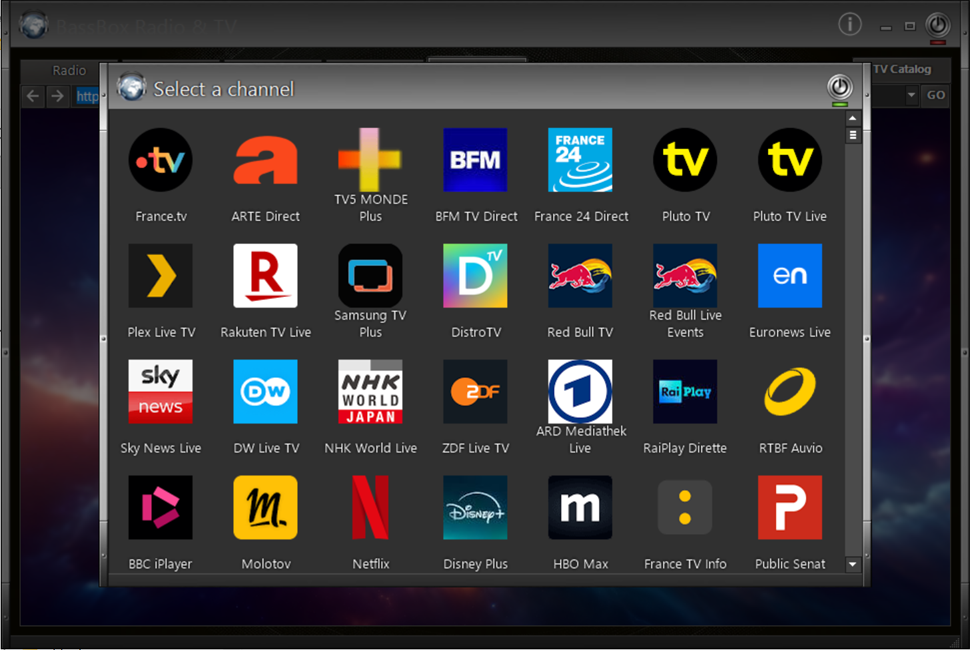
Instead of maintaining a large list of individual TV channels, BBR now provides a visual TV catalog using thumbnails. Selecting a thumbnail opens the corresponding TV portal directly inside the integrated WebView2 browser.

Current portals include France and USA, and adding new entries is very simple.

The goal is to build a collection of useful, legal and freely accessible TV portals from different countries.

I am currently looking for suggestions, especially for:

  • Spain
  • Germany
  • Italy
  • Portugal
  • Canada
  • Belgium
  • Switzerland
  • Latin America

If you know a good TV portal that offers live television channels, please post the URL.

The TV catalog uses PNG thumbnails, so if you can suggest a suitable icon, even better.

Thank you for your help and testing.

The full VS2022 project is attached to this post.

9
Eye Candies / BassBox Radio C/C++ version 4.01
« Last post by Patrice Terrier on June 07, 2026, 01:52:12 pm »
BBR Update

Today I finished a major cleanup of the station management system.

Previously, stations automatically disabled by the validation thread and stations manually removed by the user were mixed together in the same file.

This has now been split into:

Code: [Select]
US_stations.lst   = master station list
US_favorite.lst   = favorites
US_broken.lst     = automatically detected bad URLs
US_removed.lst    = stations permanently removed by the user

This means:

  • A dead station is no longer confused with a user deletion.
  • User choices are preserved.
  • Broken stations can be rechecked independently.
  • Future restore and maintenance tools become possible.

I also added a small station statistics dialog showing:

Code: [Select]
Stations
Active
Broken
Removed
Favorites

The stream checker has also been improved and now distinguishes temporary network failures from more serious URL errors.

As usual, the attachment linked to the first post of this trhead has been updated.

A small change internally, but an important step toward making BBR more reliable and easier to maintain.
10
Eye Candies / BassBox Radio C/C++ version 4.00 (updated)
« Last post by Patrice Terrier on May 24, 2026, 01:50:10 pm »
The project code has been updated, see new attachment linked to the first post.

05-22-2026
Removing radio didn't updated the counter.
The Oscillo popup, is now a real child of the Radio TAB.

05-24-2026
Better radio icon management.
Thread detection revised when using "Update".
The tab "Radio" is now using auto column size adjustment when resizing the window.
Marquee alignment was improperly using anchor mode.
Pages: [1] 2 3 ... 10