zBrowser – Lightweight Win32 File Dialog ReplacementI’ve just integrated a new feature into my custom file dialog
zBrowser, used across my apps (MBox64, ObjReader, etc.).
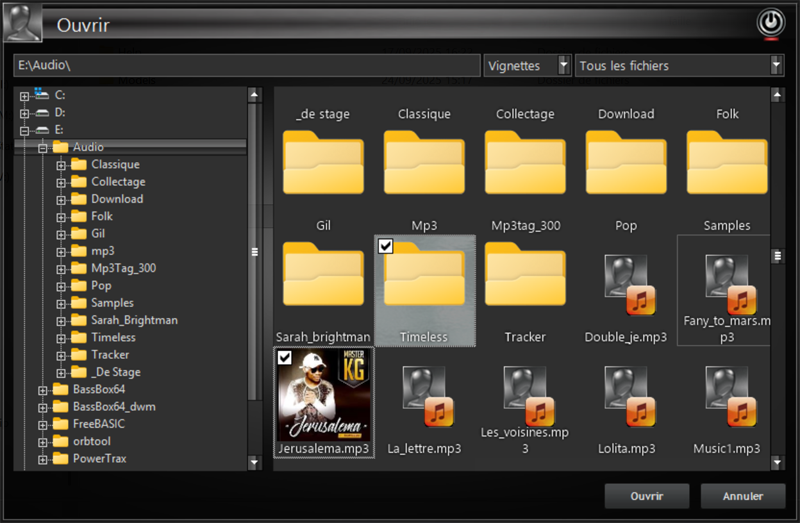 What it is:
A fully custom, skinned, Win32 file explorer built on top of
GDImage + WinLIFT, designed to replace the standard Open/Save dialog with something faster, cleaner, and fully controllable.
Key features:* ✔ Dual view: List / Thumbnails (with real previews)
* ✔ Native shell icons + overlays
* ✔ Fast folder navigation (TreeView + ListView sync)
* ✔ Multi-selection support
* ✔ Built-in media detection (audio, image, ORB, etc.)
* ✔ Custom popup menu ("Open with", Properties, etc.)
* ✔ Persistent state (folder, sorting, view mode)
New addition: Drag & Drop (2 KB only)* ✔ Custom drag visual (layered window, alpha = 200)
* ✔ Multi-file drag (true MULTI_SZ → CF_HDROP)
* ✔ Works between my apps (MBox64 ⇄ ObjReader)
* ✔ No OLE / COM / ATL / MFC
* ✔ Pure Win32 (WM_DROPFILES)
Design philosophy:* No bloat
* No hidden frameworks
* Full control
* Maximum reuse of existing engine code
Everything is built using existing GDImage objects (selection, thumbnails, labels), so there is
zero duplication and perfect consistency across applications.
Limitations (by design):* Does not target Explorer / modern apps (DirectUIHWND)
* OLE drag & drop intentionally avoided to keep things lightweight
Result:A fast, clean, and fully controllable file dialog with integrated drag & drop, all in a minimal footprint.
---
This is now the default file interface for my toolchain.