ShaderPlay version 2.00ShaderPlay has been completely reworked and can now capture and play
Shadertoy projects directly from their Web URL.
ShaderPlay is a tiny native Windows Shadertoy player written in
procedural C/C++ using the Win32 API and OpenGL. It supports complex multipass shaders, textures, cubemaps, video, music and Sound shaders, keyboard and mouse input, as well as audio-reactive visualizations.
The complete
Visual Studio 2022 C/C++ project is attached to this post, including the source code and a selection of ready-to-use .shc examples.
The resulting ShaderPlay executable:
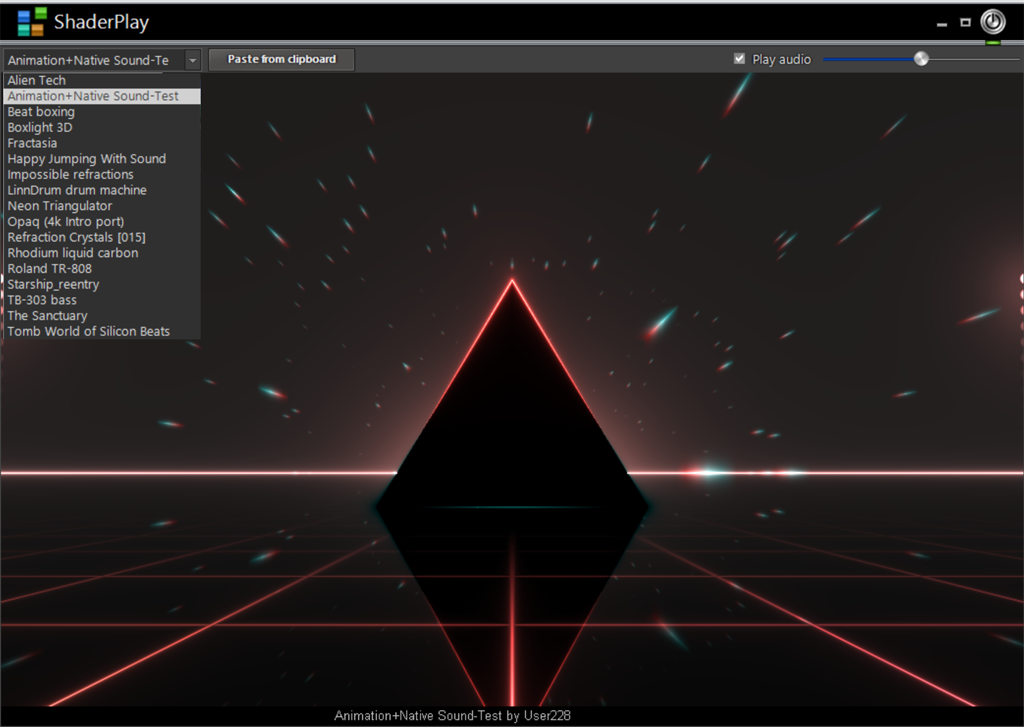 Capturing a Shadertoy project
Importing a shader from the Shadertoy website is very simple.
Open the shader you want on Shadertoy in your usual Web browser and copy its URL from the browser address bar to the Windows clipboard.
For example:
https://www.shadertoy.com/view/XXXXXXXXWhen ShaderPlay detects a valid Shadertoy URL in the clipboard, a
"Paste from clipboard" button automatically appears.
Click this button to start the capture.
ShaderPlay then connects to Shadertoy, analyzes the project and retrieves everything required to reproduce it locally. This includes the GLSL code and, depending on the shader, its multipass information, textures, cubemaps, video and music resources.
Once the capture is complete, the shader can be played immediately and is saved in the local
shader folder beside ShaderPlay.exe as a single .shc (
Shader Compound) file.
The workflow is therefore:
Open the shader on Shadertoy -> copy its URL -> the "Paste from clipboard" button appears -> click it -> ShaderPlay captures the project and creates the standalone .shc file.The .shc Shader Compound formatAn .shc file packages the Shadertoy project and all the resources required to play it into a
single standalone file.
Depending on the original project, this can include the shader data, multipass information, textures, cubemaps, video and music.
Once the .shc has been created, the original Shadertoy URL is no longer required to play the shader. The file can simply be kept in the local shader folder, copied to another ShaderPlay installation or exchanged with another user.
Each .shc also contains its own
PNG thumbnail, allowing Windows Explorer to display a visual preview of the shader.
This makes .shc more than a simple cache: it is the portable ShaderPlay document format.
BBPlugin supportShaderPlay also retains support for the existing native
BBPlugin DLL visualizations.
When a
BBPlugin folder is present beside the executable, ShaderPlay automatically detects the available plugins.
In that configuration, the interface provides
two combo boxes: one for selecting the native BBPlugin visualizations and another for selecting the .shc Shadertoy shaders.
ShaderPlay can therefore be used both as the original BBPlugin visualization host and as a native Shadertoy player.
AudioShaderPlay can work with several different audio sources.
When a Shadertoy project includes its own music/audio track, that track is retrieved during capture and embedded directly into the .shc file. It is restored automatically when the shader is played, so no external audio file is required.
You can also
drag and drop your own audio file onto ShaderPlay.
In this case, the dropped audio takes priority over the audio track built into the shader. This makes it possible to play an audio-reactive shader using your own music instead of its original track.
When the dropped audio has finished, ShaderPlay can return to the audio supplied by the shader itself.
Shadertoy
Sound shaders are different again. They do not use a prerecorded audio track: the sound itself is generated in real time by the GLSL shader.
The same audio system can also drive the native BBPlugin visualizations.
A note about GPU performanceShaderPlay executes the
original Shadertoy GLSL code directly on the GPU.
It deliberately does not simplify or rewrite shaders to accommodate slower hardware.
Many shaders will run perfectly well on modest hardware, but some Shadertoy projects are extraordinarily demanding, particularly complex multipass shaders and shaders performing intensive real-time Sound calculations.
For the most demanding shaders, a
dedicated GPU is highly recommended.
Integrated graphics may run many shaders correctly, but particularly intensive projects can result in lower frame rates, sluggish interaction or occasional short stalls.
ShaderPlay's objective is to reproduce the original Shadertoy project as faithfully as possible rather than modify it to accommodate slower graphics hardware.
Source codeThe attachment contains the
complete C/C++ Visual Studio 2022 project, not just the compiled executable.
This is native Windows code using the Win32 API and OpenGL, so anyone interested in how the Shadertoy environment, multipass rendering, resources, Sound shaders, audio and .shc packaging are implemented can examine and modify the actual source code.
A selection of ready-to-use .shc files is included, so ShaderPlay can be tested immediately without first capturing shaders from the Web.
You can then visit Shadertoy, find shaders you like, copy their Web URL and let ShaderPlay capture them to build your own local collection of standalone .shc files.
And,
ShaderPlay.exe is only 79 KB.