Author Topic: Multimedia players  (Read 101255 times)

Patrice Terrier

  • Administrator
  • *****
  • Posts: 2004
    • zapsolution
Multimedia players
« on: December 15, 2016, 07:01:39 pm »
MediaBox (MBox64)

Is a GDImage/WinLIFT 64-bit application to play audio, video, and images, using Drag and Drop of individual or multiple files, or a complete folder (recursivity search).

When using a complete folder or multiple files, you can use the edge auto/hide arrows to move from one media to another.
You can also change the Interlude theme using the same.

To change the wallpaper background, click with the left or right mouse button on the top left icon.
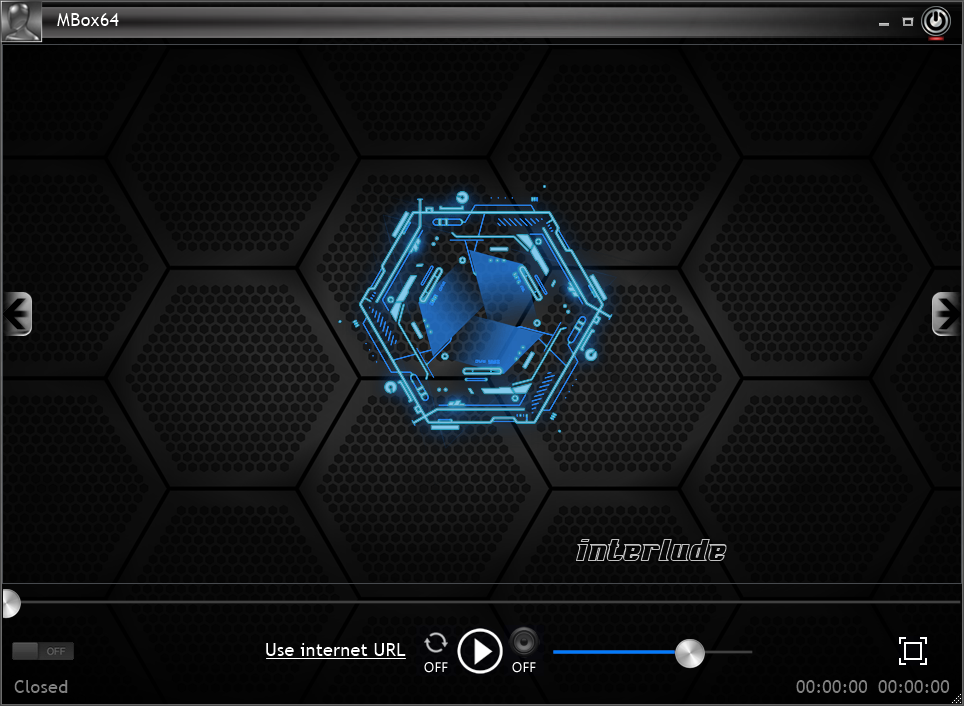


The On/Off switch is turned On, as soon as you Drag or Open a Media.
Switching to Off, comes back to the default Interlude mode, while all media are unloaded from memory.

When in full screen mode, the control panel fades away after 4 secondes of mouse inactivity, to show it back, just move the mouse.

Note: While MediaBox is able to use the same video codecs than Windows 10 "Movies & TV", it is recommended to install the CCCP 64-bit codec pack, for accurate video size detection.

All bottom panel controls are using GDImage widgets acting the same than real Windows controls.

The public binary can be downloaded directly from this link.
To avoid any UAC problem read this post.

Note: VIP64 is a video-only player (however it can play from DVD or unencrypted Blu-Ray).

Note: Each player is provided with its full C++ VS2017 source code project.

TCLib plugins:
The latest TCLib 64-bit OpenGL visual plugins VS 2015 projects are also attached to this post, each of the the binary DLL, must be copied into the BBplugin folder and replace the previous one.  The size reduction over the classic VS projects is absolutly amazing, between 4 or 7 times smaller without using a compressor.
bbp_Bubble
bbp_Candle
bbp_CubicDream
bbp_Fahrenheit
bbp_FireWorks
bbp_Hal
bbp_Helios
bbp_Laserbeam
bbp_Matrix
bbp_Oscillo
bbp_Vortex
bbp_Woofer


You can download a video presentation of MediaBox from the link below
MBox64.webm
Note: Microsoft Edge allows you to see the video in streaming mode without downloading it first.

Latest release:
Both the link and the attachment have been updated on february 10, 2019


The .7z file has been updated on 04-17-2021 to use the latest GDImage64.dll spinner API, and to fix a problem when deleting a compound jpeg file, when trying to play a missing or deleted movie.

...

« Last Edit: May 16, 2023, 06:44:21 pm by Patrice Terrier »
Patrice
(Always working with the latest Windows version available...)

Patrice Terrier

  • Administrator
  • *****
  • Posts: 2004
    • zapsolution
Re: MediaBox, MBox64
« Reply #1 on: February 05, 2017, 04:36:51 pm »
The first post of this thread has been updated with the latest version,

that brings up:

- Full integration of Bass.dll.
- Support for both Stream and Music (Amiga sound tracker).
- BassBox woofer animation, for any audio without Cover Art.
- Real time Oscilloscope.
- Many enhancements to the source code.


Note: A few AMIGA sound trackers have been attached to this post for test purpose.
I must say, that i am always amazed to see the size and the great audio quality of these most than 30 years old AMIGA files.
And that was the time of Visual Player 2.0, that was a big source of inspiration for my own Zap Media Solution player.

...
« Last Edit: December 16, 2017, 12:42:17 pm by Patrice Terrier »
Patrice
(Always working with the latest Windows version available...)

Patrice Terrier

  • Administrator
  • *****
  • Posts: 2004
    • zapsolution
Playing visual plugins
« Reply #2 on: February 20, 2017, 05:45:38 pm »
The first post of this thread has been updated with the latest version,

that brings up:

- Full support of 64-bit BassBox OpenGL visual plugins.
- New widget button to enable/disable cover art.
- New widget button to enable/disable the visual plugins (while playing audio).

When plugins are enabled, click with the left or right or mouse button on the client area to move from one to another.


...
« Last Edit: December 16, 2017, 12:41:47 pm by Patrice Terrier »
Patrice
(Always working with the latest Windows version available...)

Patrice Terrier

  • Administrator
  • *****
  • Posts: 2004
    • zapsolution
Re: Multimedia players
« Reply #3 on: March 07, 2017, 02:15:38 pm »
The first post of this thread has been updated with the latest version,

With a new set of visual plugins.


...
« Last Edit: December 16, 2017, 12:40:47 pm by Patrice Terrier »
Patrice
(Always working with the latest Windows version available...)

Patrice Terrier

  • Administrator
  • *****
  • Posts: 2004
    • zapsolution
Re: Multimedia players
« Reply #4 on: March 17, 2017, 05:55:29 pm »
New 64-bit plugins of only 14848 bytes each!

Who said 64-bit was bloated  8)

- bbp_Fireworks
- bbp_Candle


« Last Edit: December 16, 2017, 12:41:02 pm by Patrice Terrier »
Patrice
(Always working with the latest Windows version available...)

Patrice Terrier

  • Administrator
  • *****
  • Posts: 2004
    • zapsolution
New plugins
« Reply #5 on: March 24, 2017, 04:56:00 pm »
New 64-bit plugins.

- bbp_Vortex


- bbp_CubicDream


« Last Edit: March 24, 2017, 04:59:03 pm by Patrice Terrier »
Patrice
(Always working with the latest Windows version available...)

Patrice Terrier

  • Administrator
  • *****
  • Posts: 2004
    • zapsolution
SRT subtitles
« Reply #6 on: August 17, 2017, 06:45:43 pm »
New version has built-in support to display automatically .srt subtitles while playing a video.
It has been enhanced to better perform codepage detection within .srt,
codepage = CP_UTF8, only if there is a BOM header
else
codepage = CP_ACP

In order to use this feature, both the movie and the subtitle file must be into the same folder.
Their name must match exactly, except for the extension.
« Last Edit: December 01, 2017, 04:54:19 pm by Patrice Terrier »
Patrice
(Always working with the latest Windows version available...)

Patrice Terrier

  • Administrator
  • *****
  • Posts: 2004
    • zapsolution
Re: Multimedia players
« Reply #7 on: October 30, 2017, 03:11:03 pm »
The first post of this thread has been updated with the latest version using "The Movie Database" to query either for Movie or TV serie.

When querying for TV, the original file name must completed with S??E?? (where ?? is any number in the range 01-99)
S or s = Season
E or e = Episode

MBox64, is based on Media Foundation.


...
« Last Edit: January 08, 2018, 10:06:17 pm by Patrice Terrier »
Patrice
(Always working with the latest Windows version available...)

Patrice Terrier

  • Administrator
  • *****
  • Posts: 2004
    • zapsolution
Re: Multimedia players
« Reply #8 on: December 01, 2017, 12:10:11 pm »
A new version of MBox64, has been attached to the first post of this thread, using the latest TMD.h version.


It has been checked with the latest Windows 10 Fall Creators 1709, and everything seems to work fine with it...
« Last Edit: December 16, 2017, 12:39:49 pm by Patrice Terrier »
Patrice
(Always working with the latest Windows version available...)

Patrice Terrier

  • Administrator
  • *****
  • Posts: 2004
    • zapsolution
MBox64 3.00
« Reply #9 on: Today at 11:10:42 am »
MBox64 3.00 — Full Composited GLSL Playback (No Compromise)


After a long development and consolidation phase, it is time to officially present MBox64 3.00.

The screenshot below shows MBox64 playing a GLSL plugin in full composited mode, with true per-pixel alpha, no tearing, no intermediate capture, and no GPU readback hacks.

This is not a shader demo.
This is a real multimedia player, running real-time GLSL visualizations, fully integrated into a Win32 / GDI+ / OpenGL composited pipeline.

What makes this unique

To my knowledge, no other Windows multimedia player is currently able to do all of the following simultaneously:
  • Run modern GLSL shaders inside a legacy OpenGL host
  • Preserve full alpha compositing through the entire pipeline
  • Integrate seamlessly with layered windows and GDImage
  • Remain tear-free, audio-synchronized, and visually stable
  • Work without screen capture, without DWM hacks, and without off-screen video surfaces
This is not OBS-style compositing.
This is not shader playback inside a video texture.
This is true GPU rendering, composed natively with the Windows desktop.

Technical highlights
  • 64-bit native C/C++, no scripting layer
  • WinLIFT + GDImage composited rendering
  • Hybrid OpenGL architecture (legacy context + modern GLSL path)
  • Bass / Media Foundation audio backend
  • Real-time audio-driven shaders
  • No GPU → CPU frame readback
  • Deterministic render pipeline
Note: MBox64 is not DPI-aware.
Window scaling is handled by Windows itself, which allows the composited pipeline to remain stable and predictable across display configurations.

Why this matters

Most “visualization software” today relies on:
  • screen capture,
  • FBO readbacks,
  • or opaque swap chains that break alpha.
MBox64 3.00 proves that high-end GLSL visuals can be treated as first-class UI elements, not as videos or overlays.

This opens the door to:
  • fully composited shader UIs,
  • shader-driven audio players,
  • live GLSL tools,
  • and future hybrid 2D/3D desktop applications.
Screenshot context

The screenshot shows:
  • a GLSL Waveform plugin
  • running in full composited mode
  • with true transparency
  • inside the MBox64 3.00 main window
No post-processing.
No capture.
No trick.

Just the pipeline working as designed.

Source code

The full C/C++ VS 2022 project is attached to this post.
« Last Edit: Today at 01:03:06 pm by Patrice Terrier »
Patrice
(Always working with the latest Windows version available...)
