Author Topic: zBrowser  (Read 5634 times)

Patrice Terrier

  • Administrator
  • *****
  • Posts: 2015
    • zapsolution
zBrowser
« on: March 20, 2026, 06:32:51 pm »
zBrowser – Lightweight Win32 File Dialog Replacement

I’ve just integrated a new feature into my custom file dialog zBrowser, used across my apps (MBox64, ObjReader, etc.).
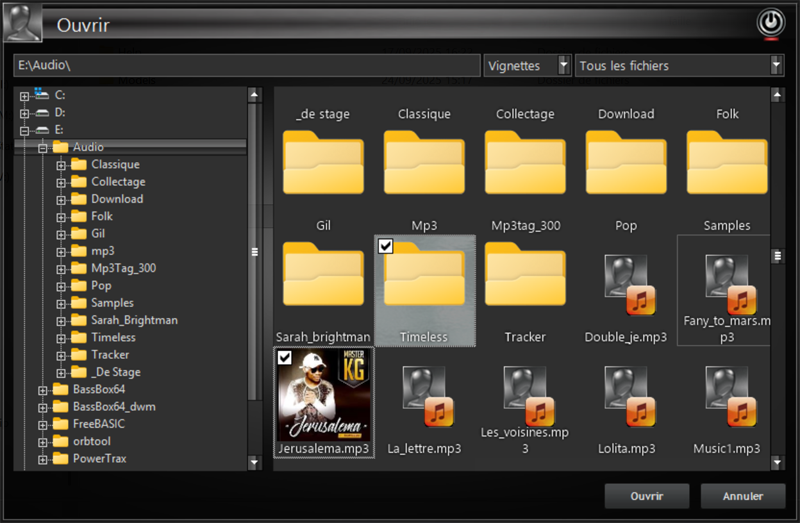


What it is:
A fully custom, skinned, Win32 file explorer built on top of GDImage + WinLIFT, designed to replace the standard Open/Save dialog with something faster, cleaner, and fully controllable.

Key features:

* ✔ Dual view: List / Thumbnails (with real previews)
* ✔ Native shell icons + overlays
* ✔ Fast folder navigation (TreeView + ListView sync)
* ✔ Multi-selection support
* ✔ Built-in media detection (audio, image, ORB, etc.)
* ✔ Custom popup menu ("Open with", Properties, etc.)
* ✔ Persistent state (folder, sorting, view mode)

New addition: Drag & Drop (2 KB only)

* ✔ Custom drag visual (layered window, alpha = 200)
* ✔ Multi-file drag (true MULTI_SZ → CF_HDROP)
* ✔ Works between my apps (MBox64 ⇄ ObjReader)
* ✔ No OLE / COM / ATL / MFC
* ✔ Pure Win32 (WM_DROPFILES)

Design philosophy:

* No bloat
* No hidden frameworks
* Full control
* Maximum reuse of existing engine code

Everything is built using existing GDImage objects (selection, thumbnails, labels), so there is zero duplication and perfect consistency across applications.

Limitations (by design):

* Does not target Explorer / modern apps (DirectUIHWND)
* OLE drag & drop intentionally avoided to keep things lightweight

Result:
A fast, clean, and fully controllable file dialog with integrated drag & drop, all in a minimal footprint.

---

This is now the default file interface for my toolchain.
« Last Edit: March 20, 2026, 06:35:25 pm by Patrice Terrier »
Patrice
(Always working with the latest Windows version available...)

Patrice Terrier

  • Administrator
  • *****
  • Posts: 2015
    • zapsolution
zBrowser demo
« Reply #1 on: March 27, 2026, 05:53:51 pm »
This is a small demo to expose the use of zBrowser with a skinned application.

The use of WinLIFT/GDImage is a mandatory to render the thumbnails (images, .orb thumbnail, audio tag cover art).
It is also important to use Common Controls (ComCtl32 v6), to use skinned combo drop down.

You can select one file, or several if you hold down the CTRL key while clicking on thumbnails.
Use right mouse click, to popup the contextual menu, to fire a specific actions.

Drag and drop, is available from a mouse wheel click, to drop a thumbnail onto MBox64 or ObjReader64 (audio, image, .orb, .obj, folder).
A complete folder audio, could be used with Mbox64.
That would work with any application using the classic DragAcceptFiles.
« Last Edit: March 27, 2026, 07:24:52 pm by Patrice Terrier »
Patrice
(Always working with the latest Windows version available...)

Patrice Terrier

  • Administrator
  • *****
  • Posts: 2015
    • zapsolution
zBff.dll (C/C++ source code)
« Reply #2 on: March 31, 2026, 10:08:19 am »
C/C++ Visual Studio 2022 source code for zBff.dll

Custom file dialog replacement built on GDImage and WinLIFT, providing full control over UI, rendering, and interaction.

Core features

  • Custom message loop
       
    • Fine-grained control over message flow
    • Idle-time processing (folder watch, process tracking)
    • Automatic Z-order restore after launched process termination

  • Full UI ownership (no common dialog)
       
    • Edit path + filter combo + view selector
    • TreeView (folder navigation)
    • ListView (details mode with sorting)
    • GDImage-based thumbnail view (custom rendered)

  • Dual view system
       
    • List mode (Explorer-like, sortable columns)
    • Thumbnail mode (GDImage objects, atlas + real previews)

  • Advanced thumbnail pipeline
       
    • Image formats via GDImage (including ORB/PNG-based content)
    • Embedded album art extraction (APIC / WMA tags)
    • Dynamic atlas fallback for non-previewable files

  • Custom drag & drop (no OLE)
       
    • WM_DROPFILES-based implementation
    • Multi-selection support via MULTI_SZ
    • Layered drag image with alpha blending
    • Real-time drop target detection (child window aware)
    • Dynamic cursor feedback over valid targets

  • Process integration
       
    • Launch files via ShellExecuteEx or custom ProcessCreate
    • Track external process lifetime (HANDLE-based)
    • Automatic dialog refocus when process exits

  • Context menu system
       
    • Open / Open with
    • Custom ObjReader integration (.orb)
    • Copy path / Delete / Properties
    • Registry-driven command resolution

  • Persistent state
       
    • Last folder, filter, view mode
    • Sort column + direction
    • Tree expansion state
    • Stored in lightweight binary config

  • Folder monitoring
       
    • Timestamp-based change detection
    • Auto-refresh with scroll/selection preservation

  • Save/Open behavior control
       
    • Unified engine with ZB_OPEN / ZB_SAVE
    • Automatic extension handling
    • Filter-aware filename correction

  • Skinning / theming
       
    • Full WinLIFT integration
    • V6 controls handled internally
    • GDImage rendering for custom visuals
Design goals

  • No dependency on standard Windows dialogs
  • No OLE drag & drop (lightweight alternative)
  • Minimal external dependencies
  • Full control over behavior, rendering, and interaction

Note: GoodMsg is the central point to add multiple language support.
« Last Edit: March 31, 2026, 10:33:10 am by Patrice Terrier »
Patrice
(Always working with the latest Windows version available...)